



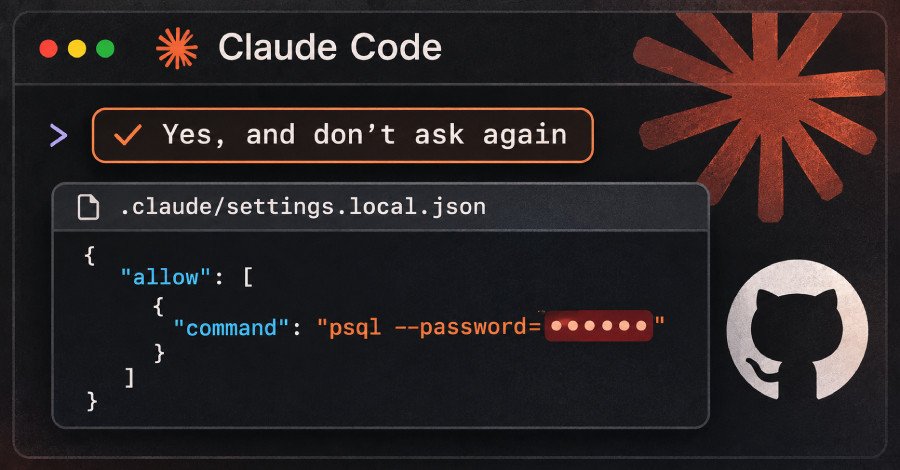

In a stark reminder of the delicate balance between developer convenience and robust security, Anthropic’s AI coding assistant, Claude Code, has been found to inadvertently expose sensitive credentials. A recent report by software security firm Apiiro reveals that thousands of passwords, API keys, and other critical secrets, intended to remain private, are publicly accessible across over a thousand GitHub repositories. This widespread vulnerability stems from a seemingly innocuous feature: the ‘Yes, and don’t ask again’ option, which, when selected, can save commands containing plain-text secrets directly into project settings files.
The Unintended Consequence of Convenience: How Secrets Are Exposed
The core of the problem lies within Claude Code’s interaction with shell commands. When a developer approves a command and opts for the ‘Yes, and don’t ask again’ setting, the AI assistant records this approval as an ‘allow rule’ in a file named .claude/settings.local.json within the project directory. While designed to streamline workflows by preventing repetitive prompts, this mechanism has a critical flaw: if the approved command contains a password, API key, or token, that secret is saved verbatim, in plain text, within this settings file.
Apiiro researchers successfully replicated this behavior using the latest Claude Code models, Opus 5.5 and Fable 5.1, confirming that sensitive data is indeed stored. This means that any command containing embedded credentials, once approved with the ‘don’t ask again’ option, becomes a permanent record of those secrets.
Why Git’s Protections Fall Short
Claude Code does attempt to mitigate this risk. Upon its first write to .claude/settings.local.json in a Git repository, it adds the file to the user’s global Git excludes list. This instructs Git on that specific machine to ignore the file in all repositories. However, this protection is severely limited. It’s a local setting, confined to one user and one computer, offering no safeguard for files already committed to a repository or for other team members. Crucially, Claude Code does not add the file to the project’s .gitignore, meaning the protection doesn’t travel with the project itself. Apiiro’s analysis further revealed that in over 500 repositories, commits co-authored by Claude itself modified this file, suggesting the AI frequently commits the file, bypassing the intended local exclusion.
Apiiro’s Alarming Discoveries
Apiiro’s extensive scan of public GitHub repositories unearthed a staggering 104,185 copies of the .claude/settings.local.json file across 103,617 repositories. Of these, a shocking 1,122 copies—approximately 1.1%—were found to contain at least one secret. In total, 1,379 distinct secrets were identified, with some keys confirmed to still be active.
Scale and Severity of the Leak
The types of secrets exposed paint a concerning picture. More than a third of the identified secrets, including 379 database passwords, provide direct access to databases. Other critical credentials include 43 SSH logins for public servers, 42 tokens for major platforms like GitHub, GitLab, and npm, and 23 AWS keys. The implications are severe, potentially leading to unauthorized data access, system compromise, and significant financial and reputational damage.
Who is Affected?
The owners of these compromised files span 63 organizations, primarily software companies of varying sizes. Apiiro highlighted particularly egregious cases, such as an admin-level cloud key belonging to a database vendor and the owner password for a medical-records database. The longevity of these exposures is also alarming: as of a recent check, every file with a secret remained on its repository’s default branch, with half of them present for at least 217 days. Furthermore, Git history and repository forks amplify the problem, with older versions of files containing an additional 734 secrets across 509 repositories, and 211 forks carrying the same secrets as their originals. Even shared .claude/settings.json files, intended for team collaboration, contributed to the leak, adding another 298 secrets.
In total, considering local settings, older versions, forks, and shared files, Apiiro identified 2,539 secrets across 1,994 repositories. A comparative analysis by the researchers showed that among 16 coding agents, Claude Code stands out as the only one confirmed to save full approved commands, including secrets, by default.
Urgent Steps for Developers: Mitigating the Risk
Given the pervasive nature of this vulnerability, immediate and proactive measures are essential for any developer or organization utilizing Claude Code. Apiiro provides a clear roadmap for remediation and prevention.
Immediate Action: Rotate and Clean
Developers must first search their GitHub organizations for both .claude/settings.local.json and .claude/settings.json. It’s crucial to inspect the Git history of each repository, even if the files are no longer present in the current version, as secrets persist in historical commits and forks. The paramount step is to rotate every password, token, and key that has ever been present in these files. Only after rotation should cleanup commence.
Preventative Measures: Best Practices for Secret Management
To prevent future leaks, developers should adopt the following practices:
- Stop Tracking Local Settings: Use
git rm --cached .claude/settings.local.jsonto untrack the file, and immediately add it to the project’s.gitignoreto ensure it’s never committed. - Clean Local Files: Even if never committed, open
.claude/settings.local.jsonon your local machine and manually delete any rules containing secrets. - Avoid Secrets in Commands: Never embed passwords or API keys directly into shell commands. Instead, refer to them as environment variables or retrieve them from a dedicated secrets manager (e.g.,
$DB_URL). This way, only the variable name, not the secret itself, is saved. - Approve Patterns, Not Specific Commands: Where possible, approve broader command patterns (e.g.,
Bash(npm run:*)) instead of exact commands that might inadvertently capture sensitive data.
It’s also important to remember that copies of these files not reaching GitHub still pose a risk. They can exist in plain JSON within project folders, npm packages, Docker images, or zip archives, highlighting the need for comprehensive internal security audits.
The Claude Code secret leak serves as a critical reminder that even AI tools designed for efficiency can introduce significant security vulnerabilities if not handled with extreme caution. Developers and organizations must prioritize robust secret management practices and remain vigilant, ensuring that convenience never comes at the cost of exposing critical infrastructure to potential threats.
For more details, visit our website.
Source: Link







Leave a comment