




Unlocking Personalization: Android’s ‘Vibe-Coding’ Widgets Take Center Stage
In the ever-evolving landscape of mobile technology, Google’s latest beta feature, “Create My Widget,” part of Android‘s “Gemini Intelligence” suite, promises a new era of home screen personalization. Launched recently for Pixel phones, this DIY widget builder has sparked curiosity and offered a unique blend of creative expression and, at times, practical frustration. As senior reviewer Allison Johnson discovered, while the feature excels at injecting personality into your device, its utility for real-time, critical information remains a work in progress.
The Joy of ‘Vibe-Coding’: From Dinosaurs to Drizzle
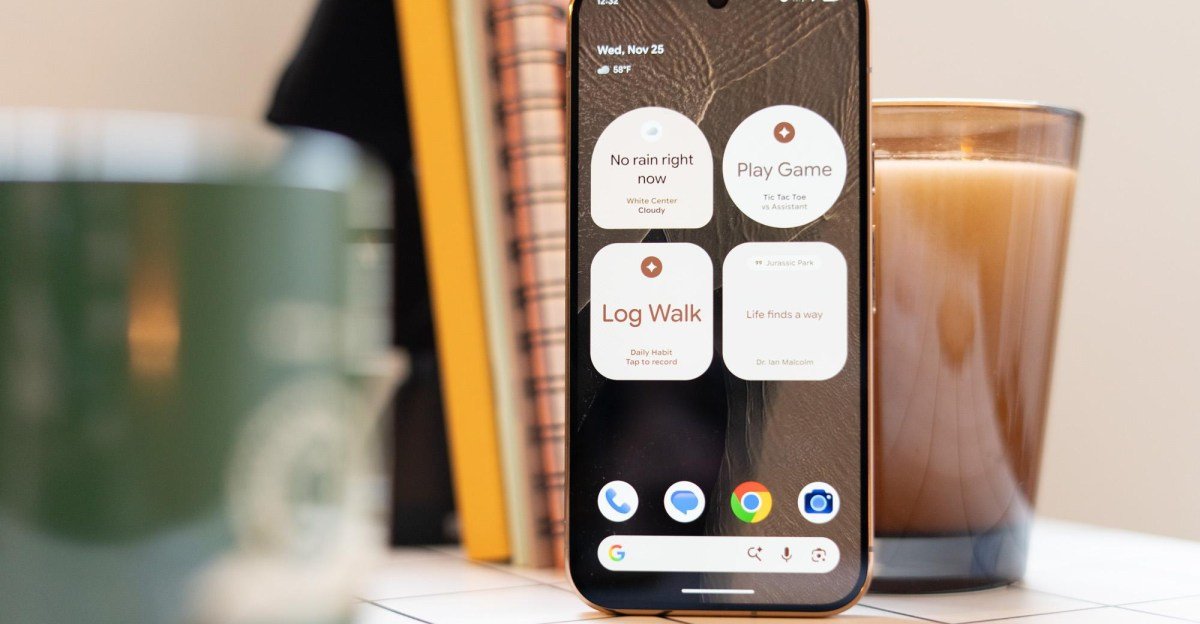
Johnson’s initial foray into “Create My Widget” quickly revealed its strength as a tool for “vibe-coding” – crafting widgets that resonate purely with personal enjoyment rather than strict functionality. In a mere 20 seconds, she conjured a widget displaying a different quote from the original Jurassic Park every hour. Tapping it might only lead to an r/MovieQuotes thread, but the sheer delight of seeing “That is one big pile of shit” adorn her home screen was undeniable.
Another whimsical creation was a weather-triggered message: “Tut tut, looks like rain” for Seattle’s frequent downpours, reverting to “No rain right now” otherwise. These examples highlight the feature’s capacity for lighthearted, instant gratification, transforming the mundane into moments of personal amusement.
Beyond Whimsy: The Quest for Practicality
While the fun factor is high, Johnson’s experience also underscored the current limitations of “Create My Widget” when it comes to more demanding, real-time information. Her primary need – a widget displaying live bus arrival times – proved elusive. Instead of glanceable data, she received a tile that, when tapped, merely prompted Gemini to search for arrival times, yielding a verbose, schedule-based response rather than the immediate, actionable information required to catch a bus.
This challenge points to a broader characteristic of many custom widgets: they often function as “little prompt shortcuts for Gemini.” Users can start with templates for habit trackers or countdowns, or leverage Google search for open-ended requests like cocktail recipes. However, the expectation of creating fully customizable “mini-apps” is met with a “one-size-fits-all” approach, where the widget often acts as a gateway to Gemini’s processing rather than a self-contained information display.
A Glimpse into the Future of Android Customization
Despite the current practical shortcomings, “Create My Widget” represents an intriguing step forward for Android personalization. It blurs the lines between apps and home screen elements, raising questions about how users will interact with their devices in the future. While it may not yet be the ultimate solution for every real-time data need, its ability to foster creative, personal “vibe-coding” offers a delightful glimpse into a more expressive and user-centric Android experience. As Johnson’s Jurassic Park widget sagely advised, “Life, uh, finds a way” – and perhaps, so too will these widgets evolve to meet both our whimsical desires and our practical demands.
For more details, visit our website.
Source: Link






Leave a comment