
In a significant escalation of cyber threats, the notorious JavaScript malware loader, GootLoader, has unveiled a highly sophisticated new tactic designed to sidestep conventional security measures. Researchers have observed GootLoader employing malformed ZIP archives that cleverly concatenate between 500 and 1,000 individual archives, creating a formidable barrier to detection.
A Masterclass in Evasion: The Malformed ZIP Archive
The core of GootLoader’s latest innovation lies in its ability to craft ZIP archives that are intentionally malformed. As Expel security researcher Aaron Walton highlighted, this isn’t merely an error; it’s a deliberate anti-analysis technique. “Many unarchiving tools are not able to consistently extract it,” Walton explained, referring to popular utilities like WinRAR or 7-Zip. This renders automated security workflows, which rely on these tools for content analysis, effectively blind.
The genius of this approach, however, lies in a critical vulnerability: Windows’ default unarchiving tool. While third-party software struggles, the built-in Windows utility consistently and reliably opens these deceptive archives. This creates a perilous scenario where victims, lured by social engineering schemes, can easily extract and execute the malicious JavaScript, while sophisticated security systems remain oblivious.
Beyond Simple Obfuscation: Multi-Layered Deception
GootLoader’s developers haven’t stopped at mere concatenation. Their latest iteration incorporates several advanced obfuscation mechanisms:
- Massive Concatenation: The malicious ZIP file is constructed by stitching together an astonishing 500 to 1,000 smaller archives.
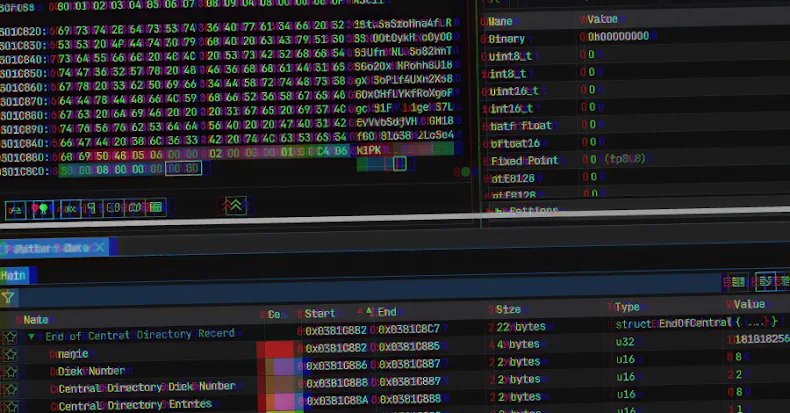
- EOCD Truncation: The archive’s End of Central Directory (EOCD) record is deliberately truncated, missing two crucial bytes. This triggers parsing errors in most unarchiving tools, preventing them from correctly interpreting the file structure.
- Randomized Fields: Non-critical fields within the archive, such as disk number and number of disks, are filled with randomized values. This tricks unarchiving tools into expecting a sequence of non-existent ZIP archives, further disrupting analysis.
Walton refers to the random concatenation and randomized field values as a “hashbusting” technique. “In practice, every user who downloads a ZIP file from GootLoader’s infrastructure will receive a unique ZIP file,” he noted. This renders traditional hash-based detection futile, as each malicious payload presents a distinct digital fingerprint, making it incredibly difficult for security teams to track and block across different environments.
The GootLoader Attack Chain: From SEO Poisoning to System Compromise
GootLoader’s distribution typically begins with search engine optimization (SEO) poisoning or malvertising. Threat actors compromise WordPress sites, luring unsuspecting users searching for common legal templates or other documents. Once a user clicks a “Download” button on these compromised sites, the malicious ZIP archive is delivered.
The delivery itself is also sophisticated. The ZIP archive is initially transmitted as an XOR-encoded blob. This blob is then decoded and repeatedly appended to itself on the victim’s browser until it reaches a predetermined size, effectively bypassing security controls designed to detect the transmission of standard ZIP files.
Upon double-clicking the downloaded archive, Windows’ default unarchiver opens the ZIP folder directly in File Explorer. Critically, launching the contained JavaScript file triggers its execution via “wscript.exe” from a temporary folder, without explicit extraction. This JavaScript then establishes persistence by creating a Windows shortcut (LNK) file in the Startup folder. Subsequently, a second JavaScript file is executed using “cscript,” spawning PowerShell commands that advance the infection, often leading to the deployment of secondary payloads like ransomware or data exfiltration tools.
Fortifying Your Defenses Against GootLoader
Given GootLoader’s evolving sophistication, organizations must adopt proactive measures to protect their systems:
- Restrict Script Execution: Consider blocking “wscript.exe” and “cscript.exe” from executing downloaded content, particularly if these executables are not essential for routine operations.
- Default File Associations: Implement a Group Policy Object (GPO) to ensure that JavaScript files (.js, .jse) are opened by default in a text editor like Notepad, rather than being executed by “wscript.exe” or “cscript.exe.”
- Enhanced Email & Web Security: Deploy robust email and web security solutions capable of detecting and blocking SEO poisoning, malvertising, and malicious downloads.
- User Education: Continuously educate users about the dangers of downloading files from untrusted sources and the importance of verifying file authenticity.
The continuous evolution of GootLoader underscores the dynamic nature of cyber threats. By understanding these advanced evasion techniques and implementing strong defensive postures, organizations can significantly reduce their risk of falling victim to this persistent and dangerous malware.
Stay informed on the latest cybersecurity threats. Follow us on Google News, Twitter, and LinkedIn for exclusive insights and updates.
For more details, visit our website.
Source: Link