
In an era where digital privacy and data consumption are paramount, the humble firewall often gets overlooked. Many users, perhaps for a decade or more, haven’t actively engaged with their Mac’s internet gatekeeper, assuming its role is either too complex or simply handled automatically. Yet, understanding which applications are silently communicating with the internet – and how much data they’re consuming – remains a critical aspect of both security and efficient resource management.
Unveiling the Hidden World of Your Mac’s Internet Activity
While macOS includes a native firewall, its utility for granular, user-friendly control over individual application access is notably limited. This often leaves users in the dark, unaware of background processes that might be chewing through data, especially problematic when tethering on limited mobile plans or simply seeking better security hygiene at home. The need for a more intuitive solution is clear: a tool that empowers users to see, understand, and control their Mac’s network traffic without requiring a degree in network engineering.
Introducing FireWally: Simplicity Meets Power
Enter FireWally, a remarkable and entirely free application developed by the talented indie Mac developers Nektony, based in Ukraine. FireWally isn’t designed for the command-line warrior; instead, it champions a streamlined, user-friendly approach that makes advanced network monitoring accessible to everyone. From its unobtrusive menu bar icon, a world of insight unfolds.
Key Features That Set FireWally Apart
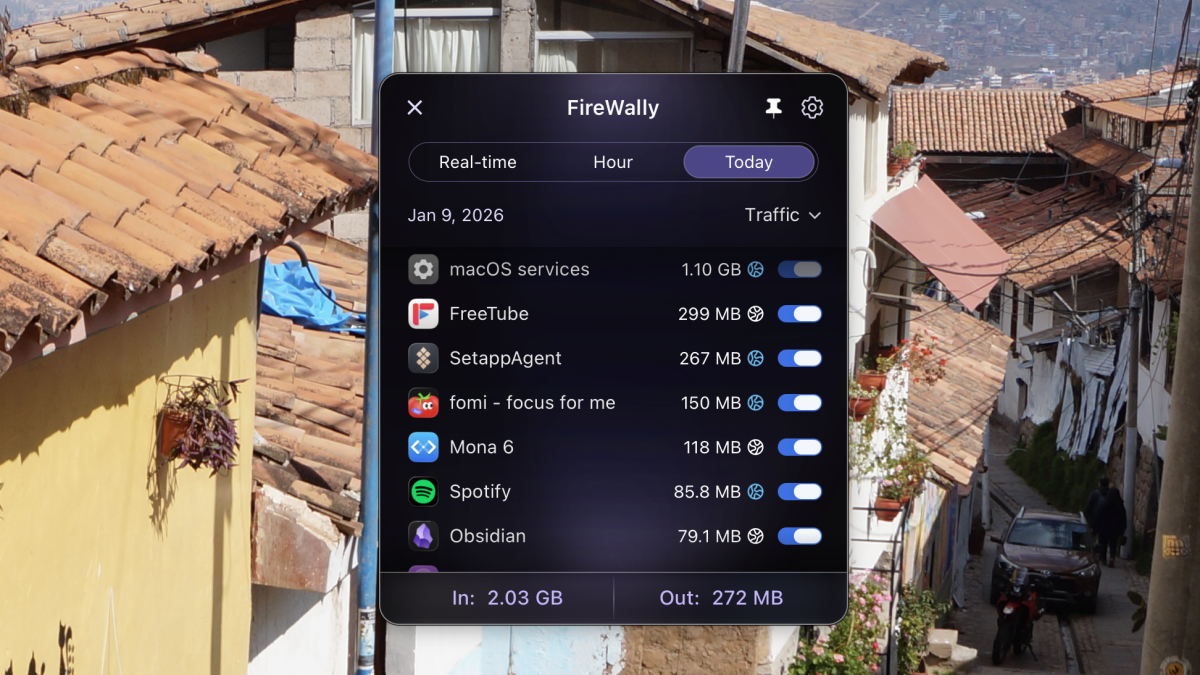
Upon clicking the menu bar icon, users are greeted with an immediate, clear list of applications currently utilizing the internet. This isn’t just a static snapshot; FireWally offers dynamic insights:
Comprehensive Traffic Overview
Instantly view a summary of all network traffic for the day, the past hour, or monitor incoming data in real-time.
Detailed Data Usage
Beside each listed application, FireWally displays its precise data consumption. Hovering over an app reveals a breakdown of both inbound and outbound traffic, offering unparalleled transparency.
Effortless Blocking
With a simple toggle switch next to each application, users can instantly block any app from accessing the internet. This is invaluable for conserving data while traveling, or for enhancing security by restricting suspicious applications.
Intelligent App Identification
A standout feature, particularly for those encountering unfamiliar processes, is FireWally’s integration with Apple Intelligence (on supported Macs). This provides AI-generated summaries of applications, helping users quickly identify what an app does or verify its legitimacy, saving precious time otherwise spent on manual web searches.
The Verdict: Essential for Every Mac User
FireWally excels precisely because of its focused simplicity. It demystifies the often-opaque world of network connections, providing Mac users with the clarity and control they need to manage their data, bolster their security posture, and gain a deeper understanding of their system’s activity. Whether you’re a casual user looking to save data on the go, or a security-conscious individual wanting more oversight, FireWally offers an elegant, free, and powerful solution. It’s not just a firewall; it’s peace of mind, delivered with intuitive design. Give it a spin – your Mac (and your data plan) will thank you.
For more details, visit our website.
Source: Link